Grosno Demo coming soon

Till, self-checkout and restaurant in one program.

Grosno runs in a browser: at the till, on the waiter’s tablet and on the warehouse clerk’s phone. It is built for the Polish market and its fiscal rules: it issues invoices in KSeF (Poland’s National e-Invoicing System), prints receipts on a fiscal printer and keeps selling when the internet goes down.

Demo coming soon Let’s talk
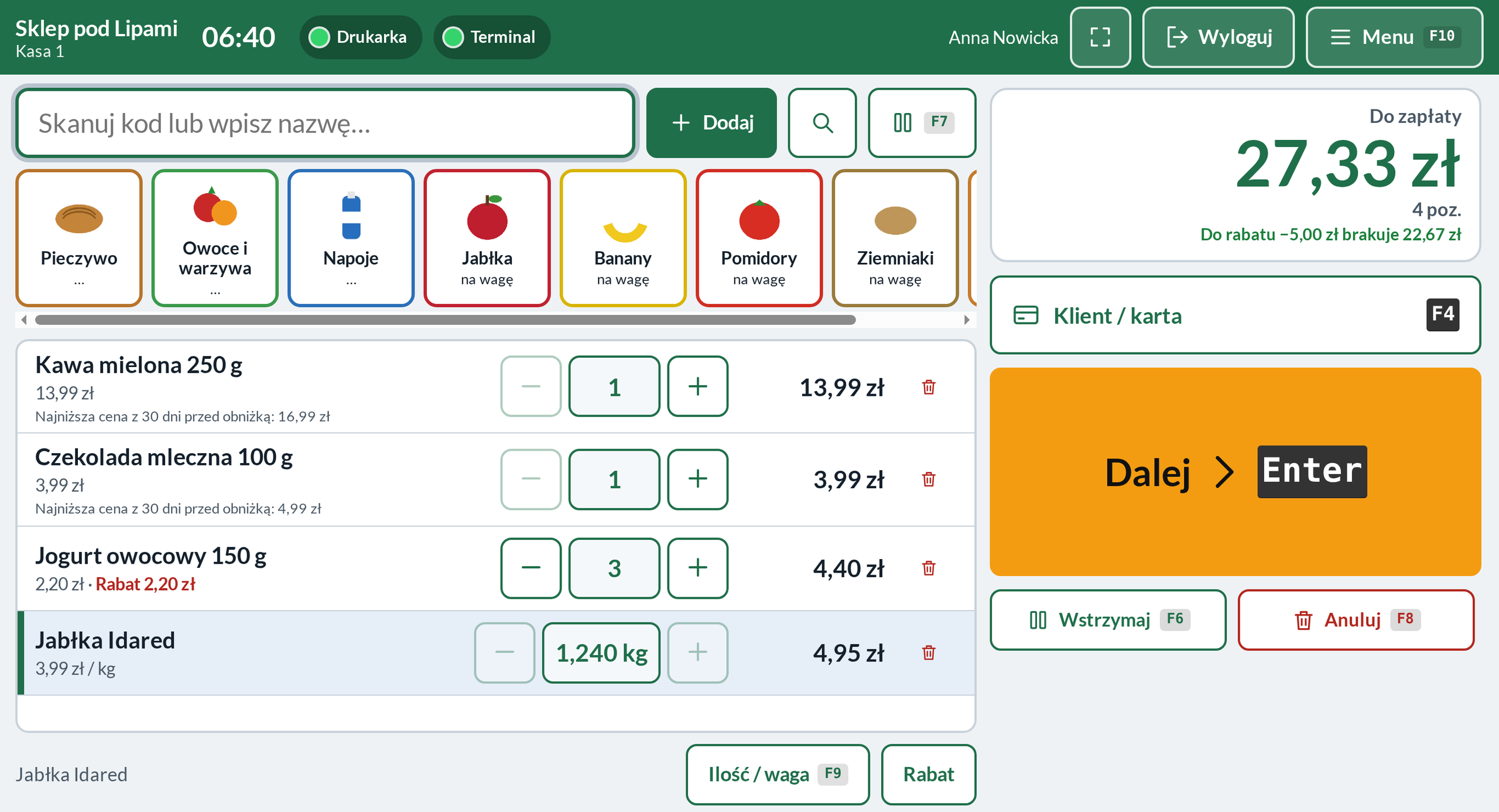
Sales screen at the Grosno till: scan field, category tiles, a basket with coffee and chocolate on promotion (with the lowest price from the last 30 days), three yoghurts on a 3-for-2 promotion and apples sold by weight, PLN 27.33 to pay and a hint showing how much is missing for a discount

Touchscreen till

  • Scanner, tiles, scale. Goods from the scanner or from tiles for items without a barcode; the scale supplies the weight.
  • Every payment. Cash with change, card through the terminal, split payment, VAT invoice at the till.
  • Customer and points. Loyalty card, points as a discount, discounts with permissions.
  • Returns and shifts. Return against a receipt, parked receipts, shift close with cash denomination count.
KSeF
invoices, corrections, offline mode, purchase invoices
Posnet
fiscal printer, receipts without waiting at the till
Self-checkout
till for customers, with a call for staff
Offline
sales without internet; head office gets the data later
MIT
based on Open Source Point of Sale

A shop, a restaurant or a store chain. The same program: we set up the shop or restaurant edition during installation and add head office when it is needed.

Shop

A neighbourhood grocery with bread and goods sold by weight. A cashier at the touchscreen till, a self-checkout next to it, a tablet and a phone in the back.

  • Self-checkout. The customer scans, weighs and pays by card. For alcohol, staff confirm the customer’s age with a PIN.
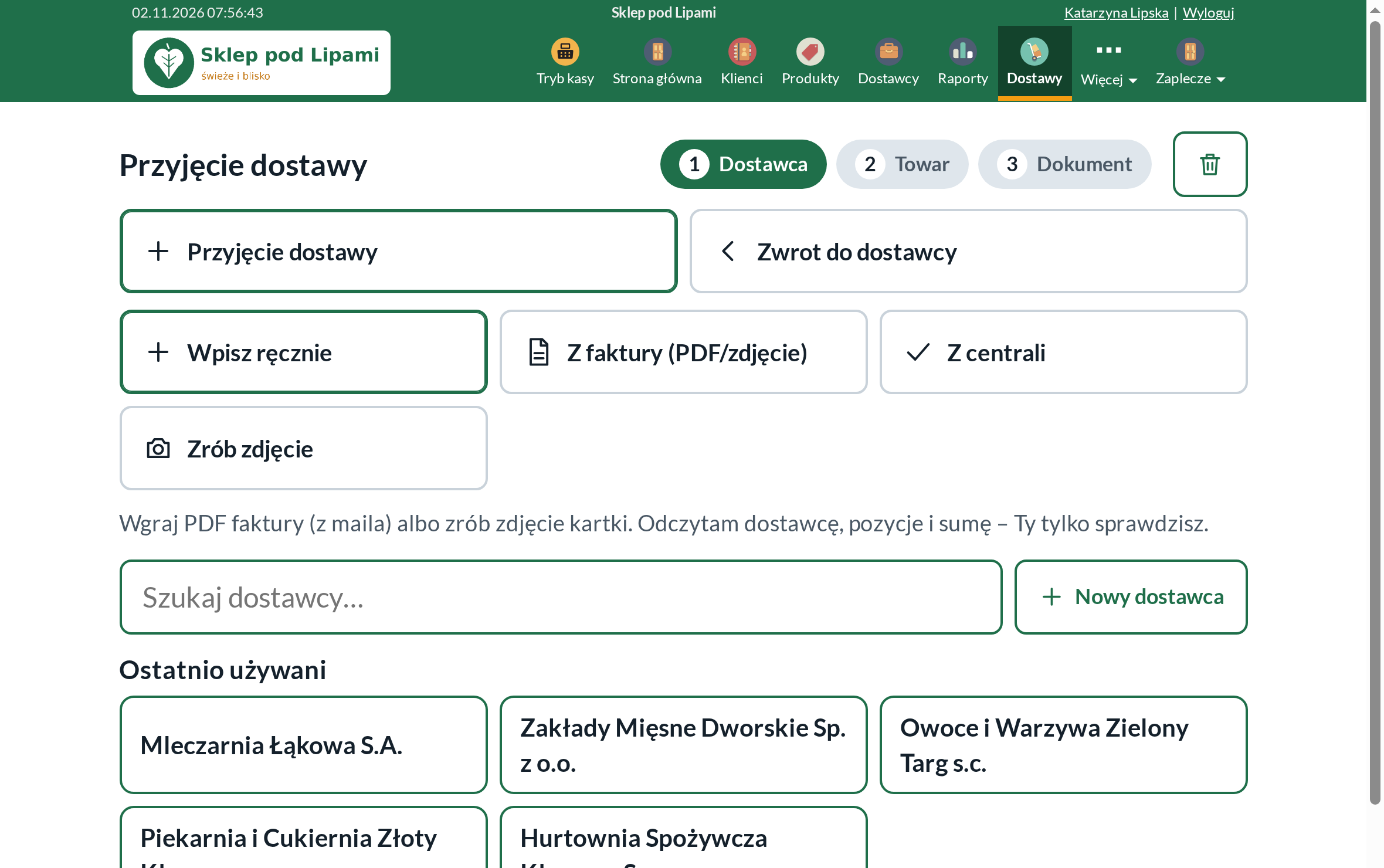
  • Deliveries. Receive goods from an invoice PDF, from a photo of a paper invoice or from KSeF.
  • Expiry dates and stock. Batches with expiry dates (the oldest are sold first), stocktaking, deposits.
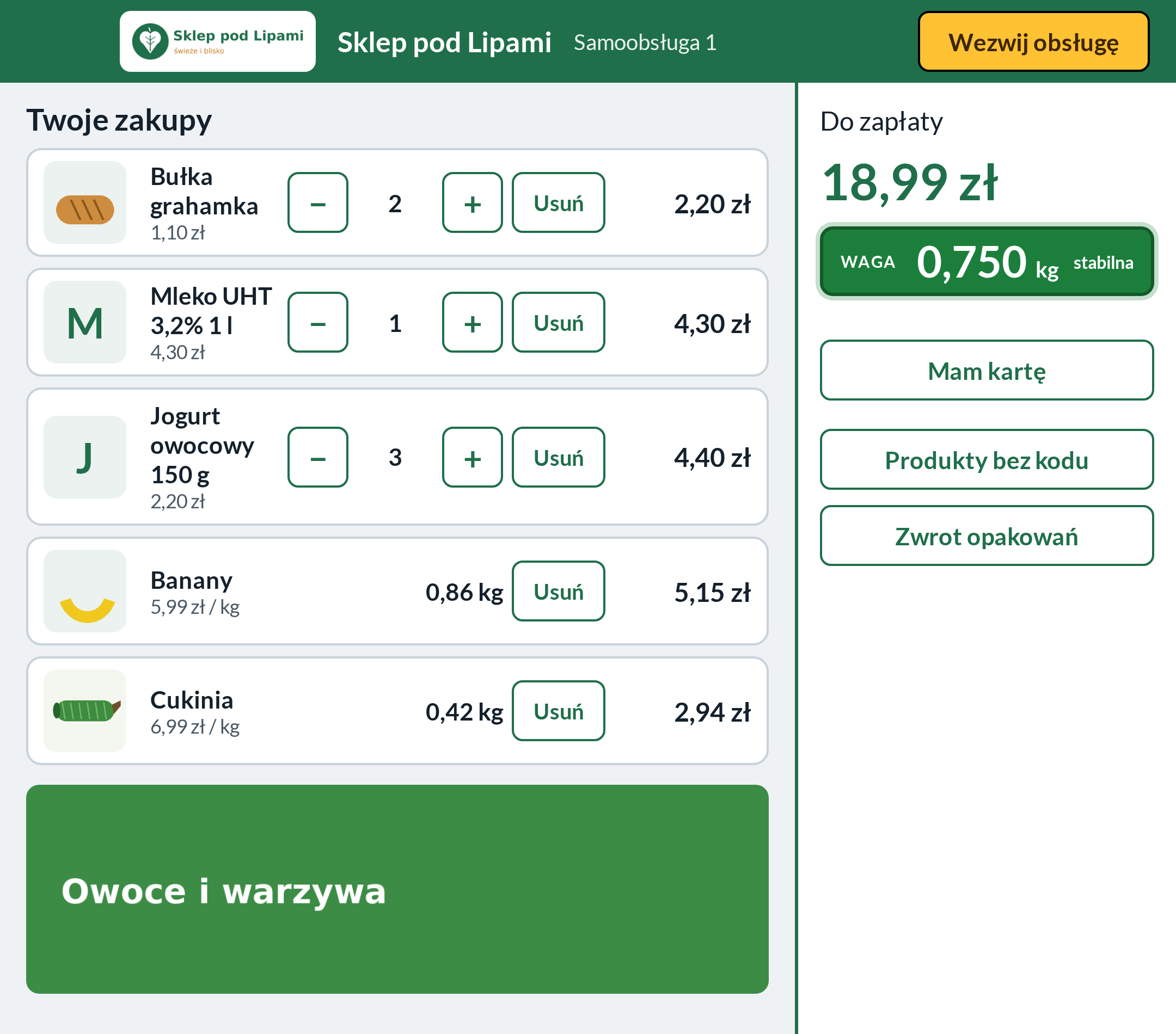
Self-checkout screen in portrait orientation: a basket with product pictures (rolls, milk, yoghurts, bananas and courgettes sold by weight), a total of PLN 18.99, and buttons for having a loyalty card, items without a barcode and returning packaging

Restaurant

A venue with a dining room, a garden, a bar and a kitchen. The waiter works on a tablet; the kitchen gets a ticket from the printer or the order on a screen.

  • Dining room. Floor plan with an editor, several bills per table, merging tables.
  • Kitchen. Courses, notes and extras, a kitchen screen with a “Ready” button.
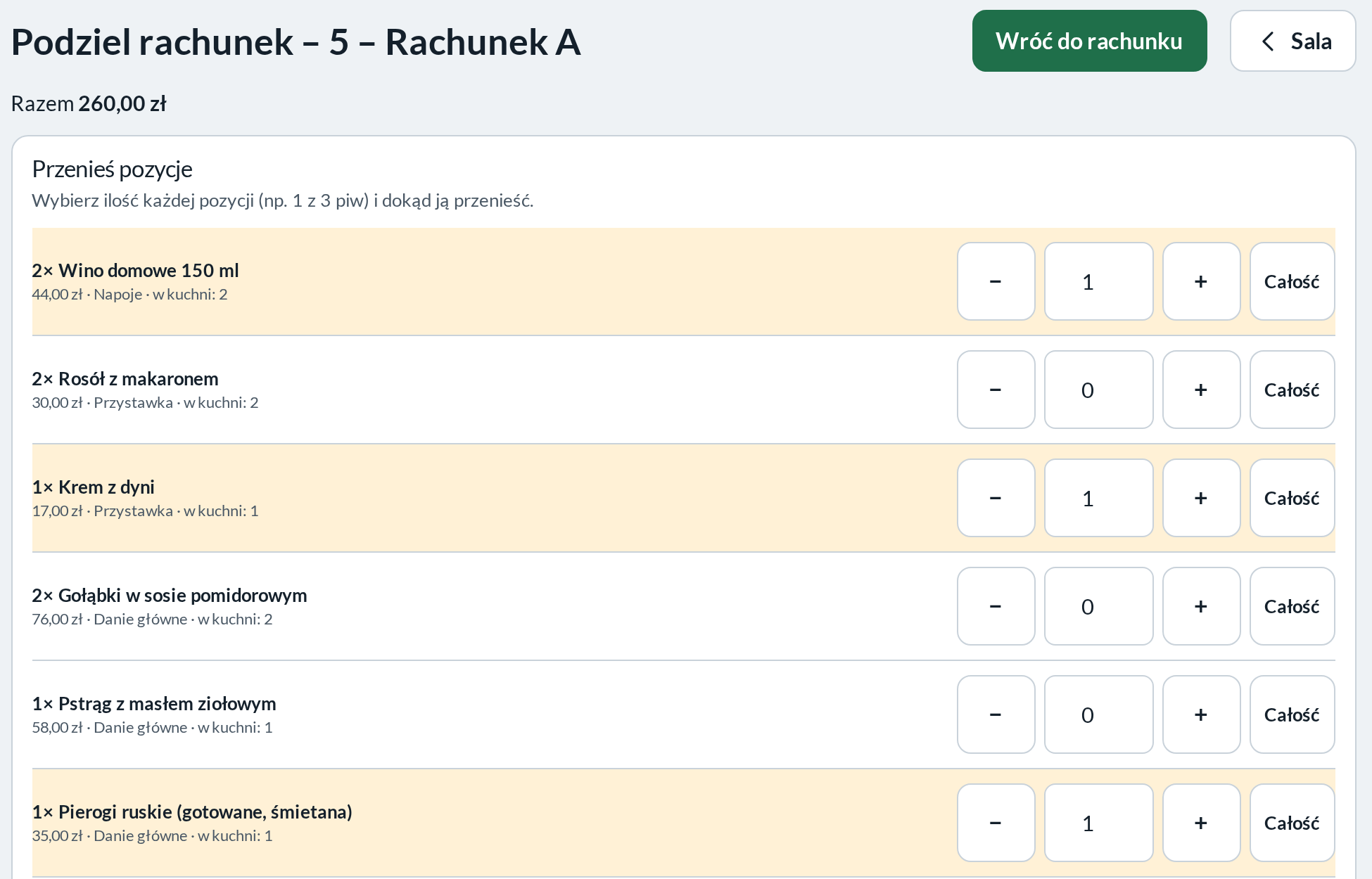
  • Bill. Split by items, quantities or equally; tips kept off the receipt.
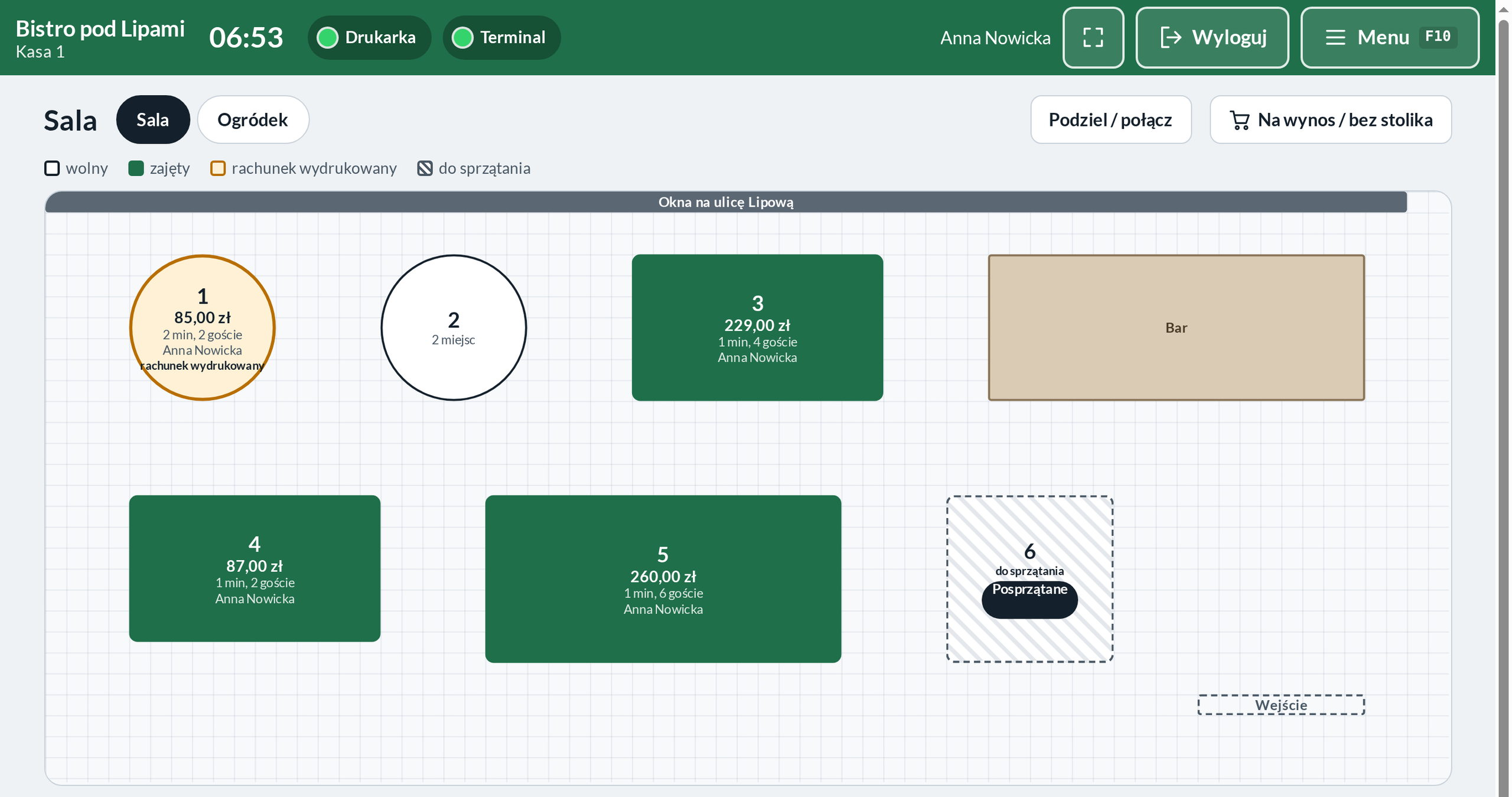
Floor plan of a bistro: six tables and a bar, four tables occupied with the bill amount shown, and a legend: free, occupied, bill printed, to be cleaned

Store chain

Several shops connected to head office (the ERPNext system). Head office sends the catalogue, prices, promotions and deliveries, and each shop sends back sales, returns, invoices and goods receipts.

  • Promotions from head office. Price cuts, “3 for 2”, discounts above a basket value, hours and days of the week.
  • Stock across the chain. Goods in other shops, transfers to your shop.
  • Shared points. A customer earns and spends points in every shop of the chain.
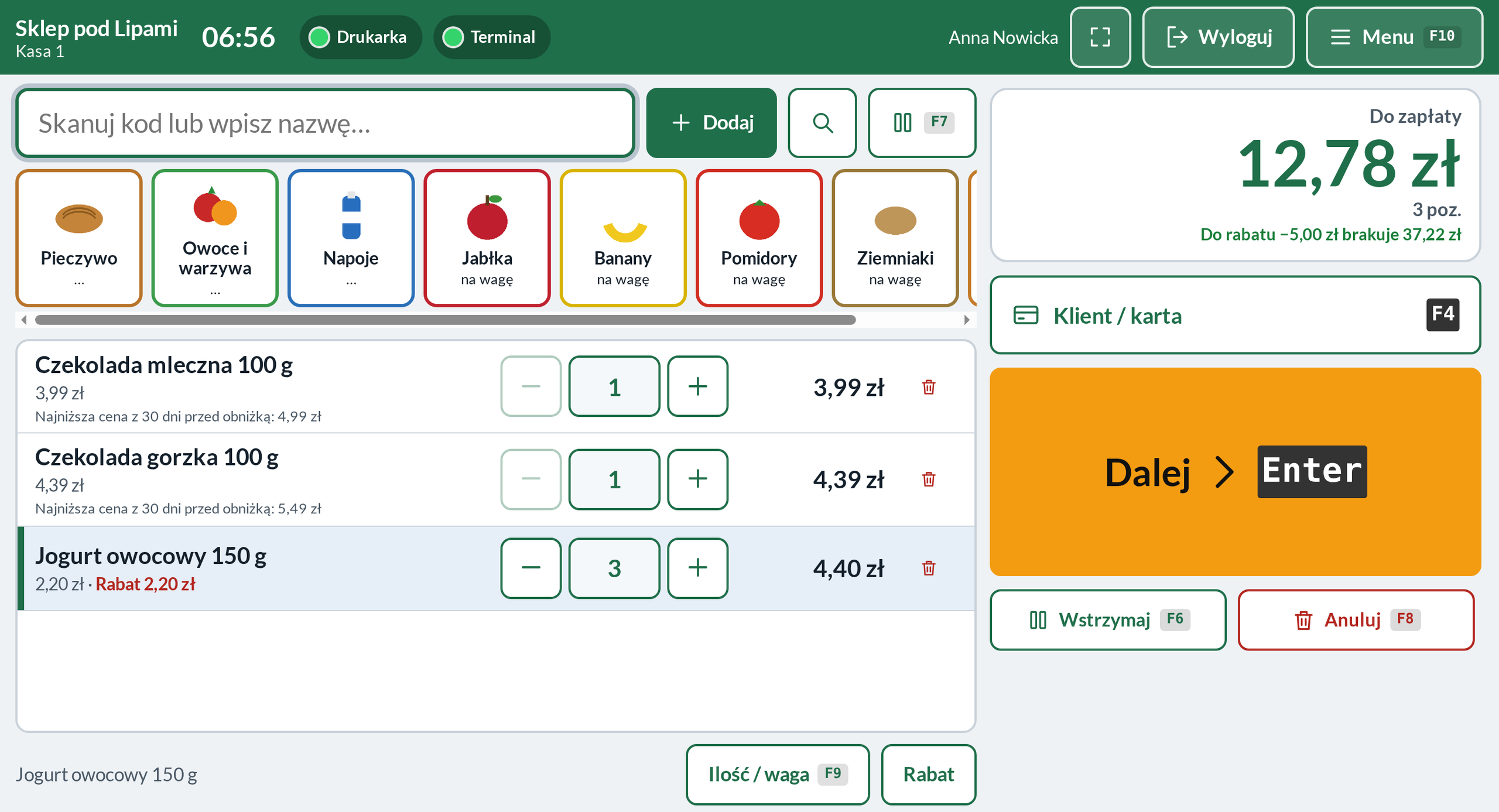
Till with promotions from head office: three yoghurts at 3 for 2 with a PLN 2.20 discount, chocolates at −20% with the lowest price from the last 30 days, and a hint that PLN 37.22 is missing for the PLN 5 discount

Back office, kitchen, complaints. The screenshots come from the program with fictitious demo data (screenshots show the Polish interface).

The kitchen gets a ticket or a screen

The waiter adds dishes with notes and extras. The kitchen sees the order on a screen, coloured by waiting time, and the next course waits until the waiter releases it.

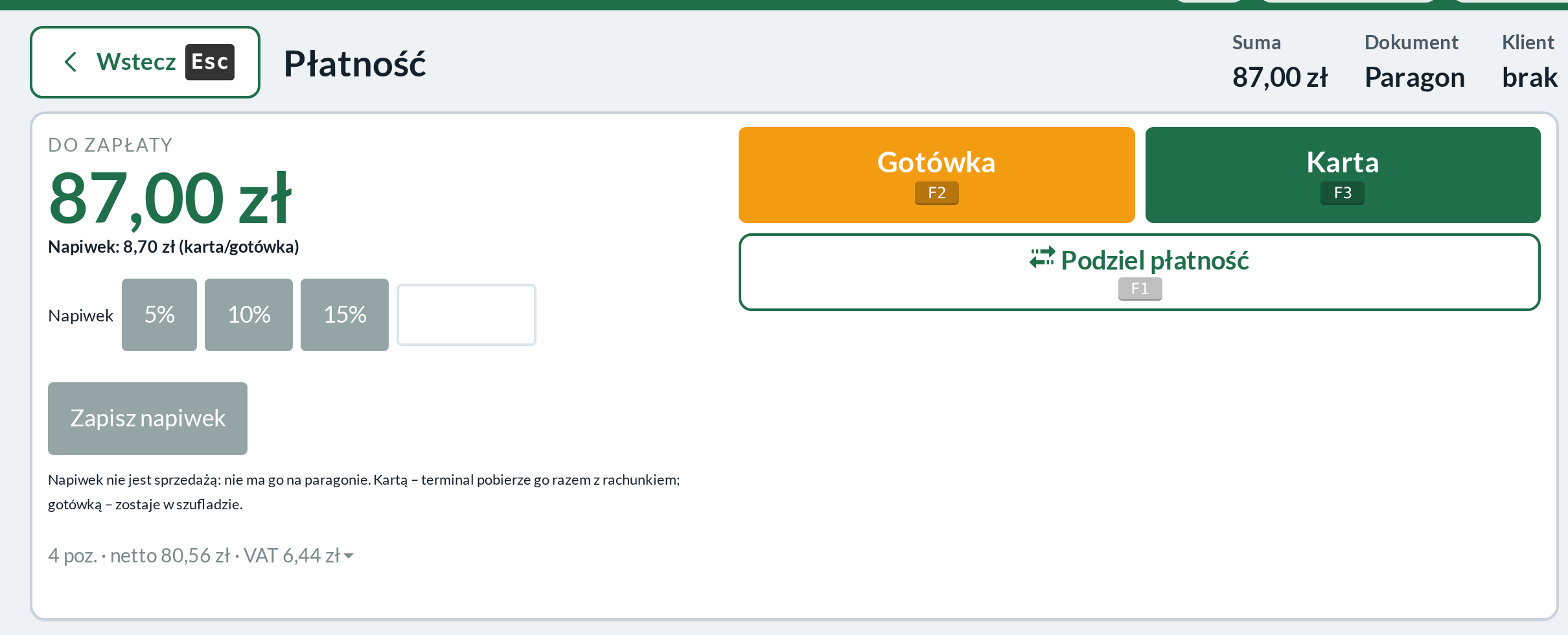
The bill can be split by items, by part of a quantity or equally between several people. Tip of 5, 10 or 15 % or a fixed amount, with a separate report.

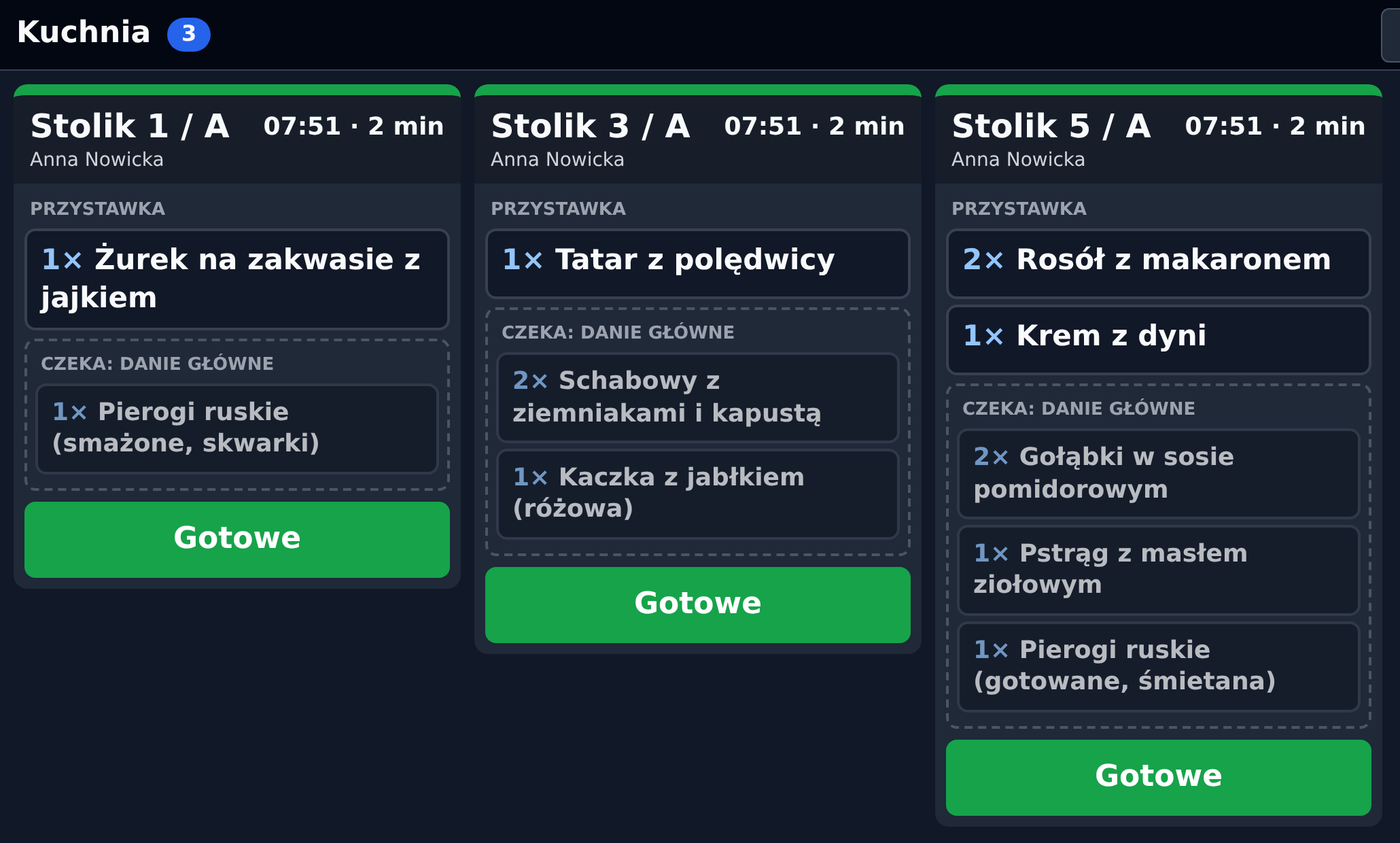
Kitchen screen: orders from three tables with starters and held main courses, and “Ready” buttons
Bill splitting page: choosing the quantity of each item to move to a new bill for the same table
Payment window with a tip: buttons for 5, 10 and 15 percent, a tip of PLN 8.70 and payment by cash or card

Deliveries from a PDF or a photo of an invoice

The program reads the supplier, the lines and the total, matches them to your products and shows what needs attention. A person checks and approves.

  • new products with a margin or a selling price
  • returns to the supplier, stock movements and adjustments
  • “Expiring soon”: markdown and write-off
  • reorder requests from the till, low stock, margin report
Goods receipt on a tablet: steps Supplier, Product, Document; buttons for entering manually, from an invoice PDF or photo, from head office, taking a photo; and recently used suppliers

Complaints with a 14-day deadline

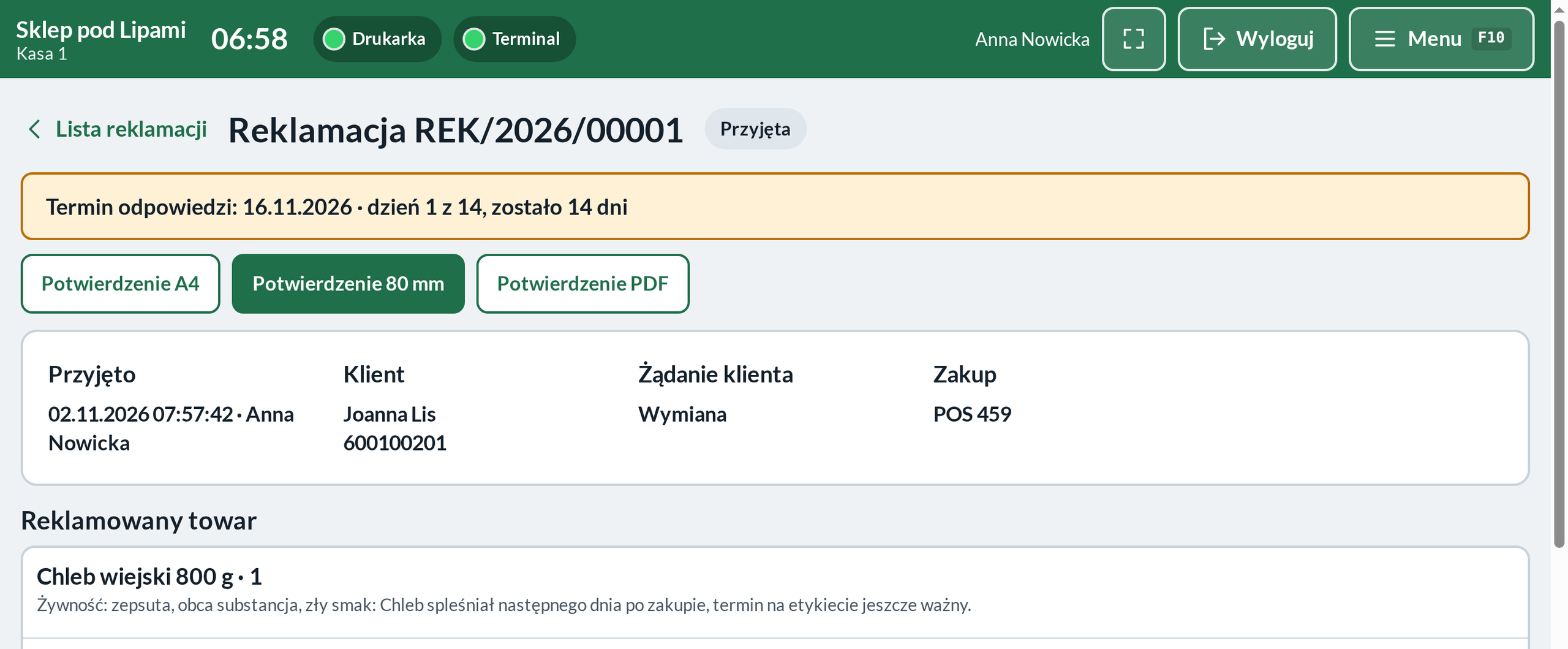
The cashier accepts a customer complaint at the till. The program counts the days left to reply and warns before the deadline.

  • confirmation on an A4 sheet, on a receipt or as a PDF, also by email
  • decision and resolution: refund, replacement, price reduction
  • handover to the supplier (WZ goods-issue document), cost to the shop, report
  • alert for food that endangers health, anonymisation of customer data (GDPR)
Complaint card REK/2026/00001: status Accepted, reply deadline 16.11.2026, 14 days left, buttons for the A4, 80 mm and PDF confirmation, and the bread that is the subject of the complaint

Warehouse on a phone

Warehouse staff get a separate phone app. You add it from the browser, with no app store. The back office also works on a tablet, with large buttons.

  • barcode scanner using the phone camera
  • stock, price, batches with expiry dates, last delivery
  • stock adjustments and stocktaking without a signal: changes wait on the phone and are sent when the network returns
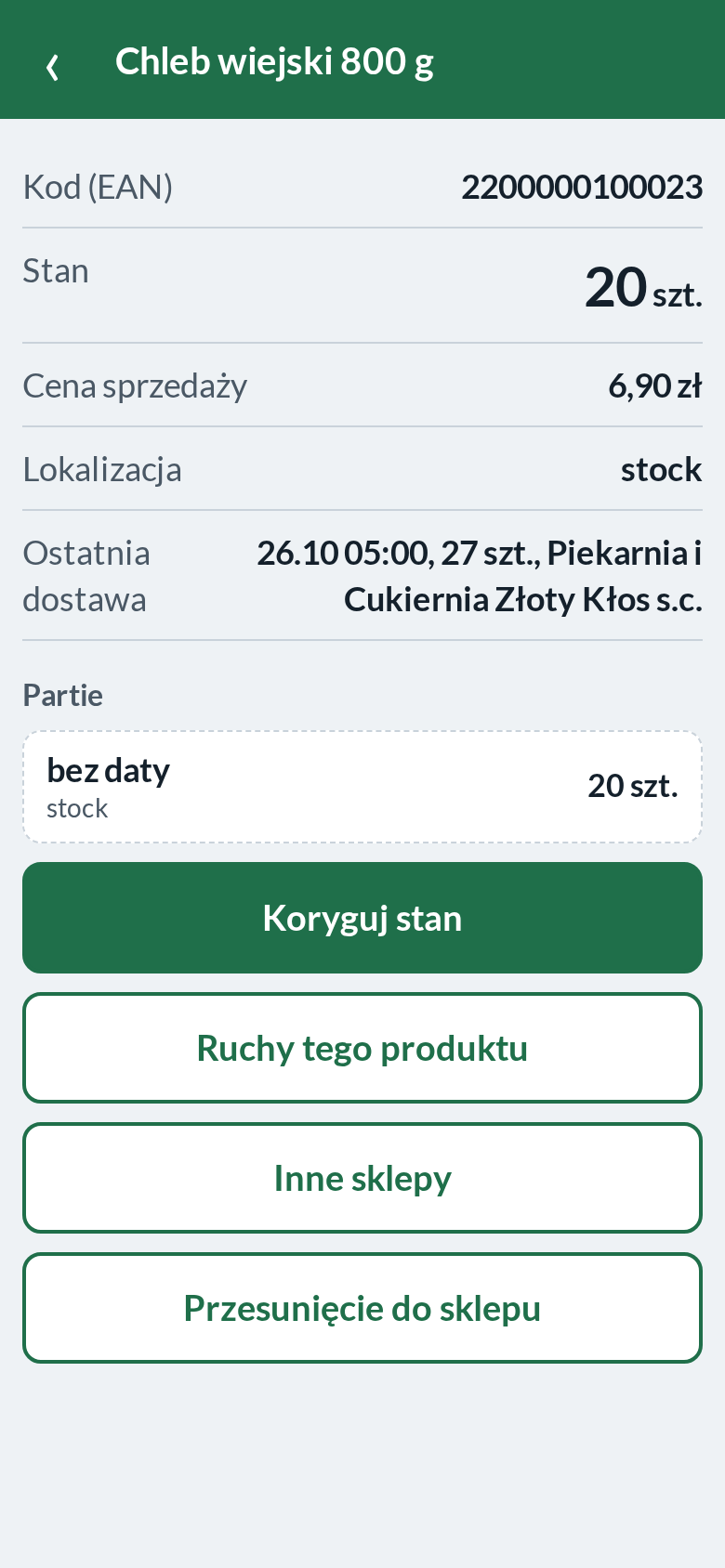
Product card in the warehouse phone app: EAN code, stock of 20 pieces, price PLN 6.90, last delivery, and buttons to adjust stock, view other shops and transfer to a shop

KSeF, Omnibus, 18+, deposits. We describe only what the program already does. Grosno is built for the Polish market and Polish fiscal rules; check the tax rules for your shop with your accountant.

KSeF

KSeF is Poland’s National e-Invoicing System. Grosno issues invoices attached to a receipt and invoices for a named buyer at the till, corrections and your own numbering series. Sending runs in the background, and every invoice shows its status and the UPO number, the official confirmation of receipt.

Offline mode for KSeF outages and technical corrections. The program downloads purchase invoices from KSeF, and you receive a delivery based on them. In a store chain, head office can take over sending.

Tested on the KSeF test environment of the Polish Ministry of Finance.

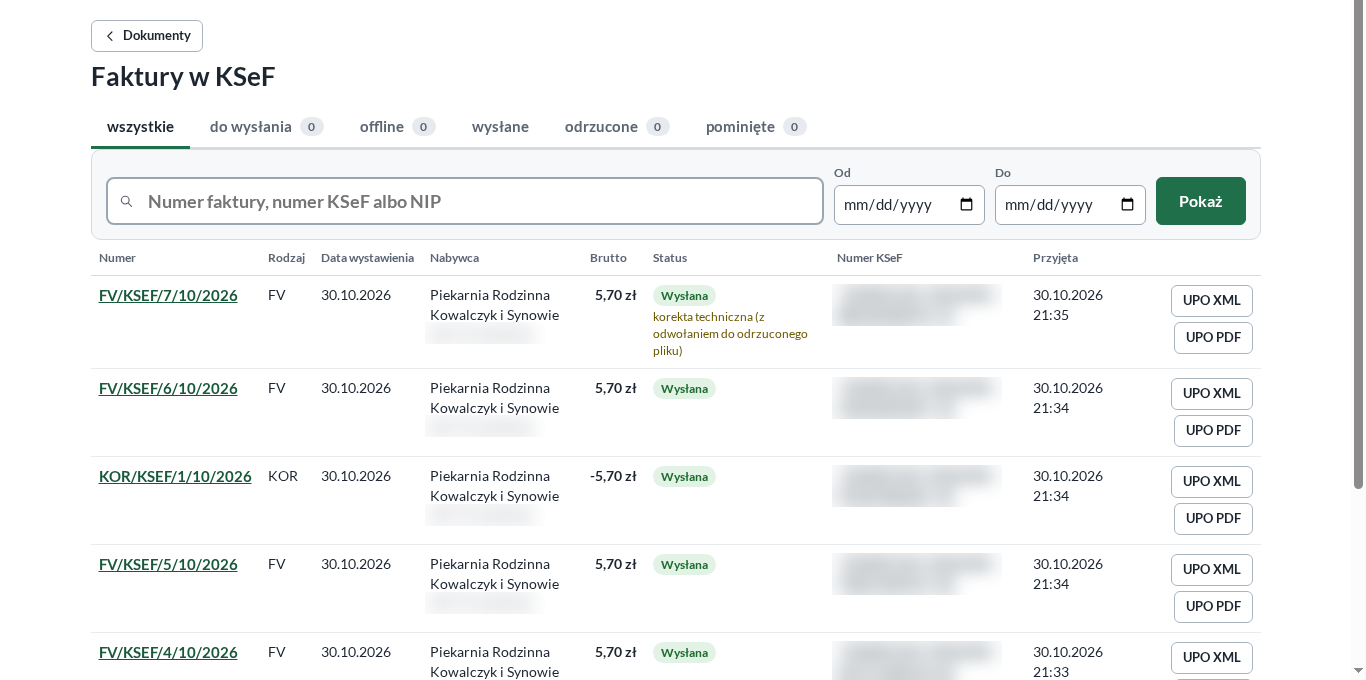
List of invoices in KSeF: tabs for to send, offline, sent and rejected; invoices with the status Sent, a KSeF number and UPO buttons

Fiscal printer

Receipts are printed one after another, so the till never waits for the printer. We tested support for Posnet fiscal printers (a Polish make) on an emulator; we confirm the specific model during installation. When the printer is not working, the till blocks sales and says why. The daily report is separate for each printer.

Price history (Omnibus)

Price history is recorded automatically. When a price is reduced, the shelf label, the till and the self-checkout show “Lowest price in the 30 days before the reduction”, as the EU Omnibus rules require.

Product lines in the till basket with the caption: Lowest price in the 30 days before the reduction, PLN 4.99 and PLN 5.49

18+ and alcohol

For 18+ goods, the till asks for an ID check before payment, and the self-checkout pauses payment and calls staff. Optionally, a night-time ban on alcohol sales during set hours.

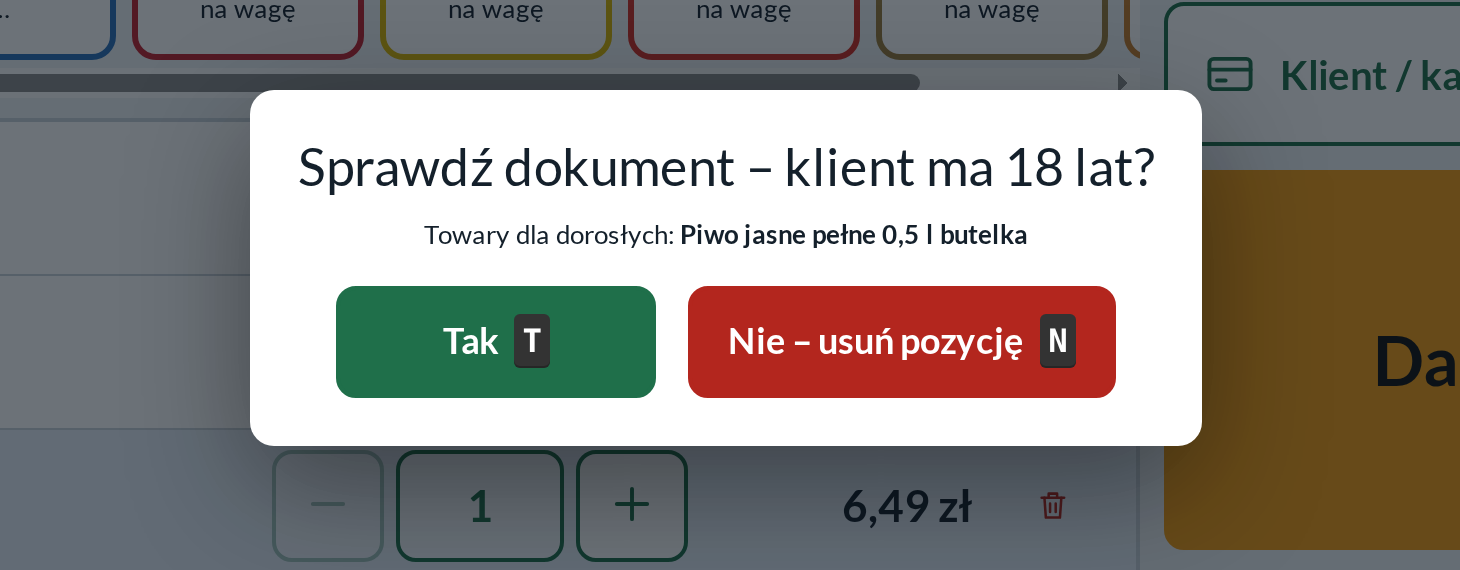
Window at the till: Check ID – is the customer 18? Light lager, full-strength, 0.5 l bottle; buttons Yes and No – remove item

Deposit return scheme

Poland’s deposit return scheme (kaucja): deposit packaging is added to the price of the goods. Taking back packaging works at the till and at the self-checkout, paid out or deducted from the receipt. The deposit report shows the amounts collected and returned.

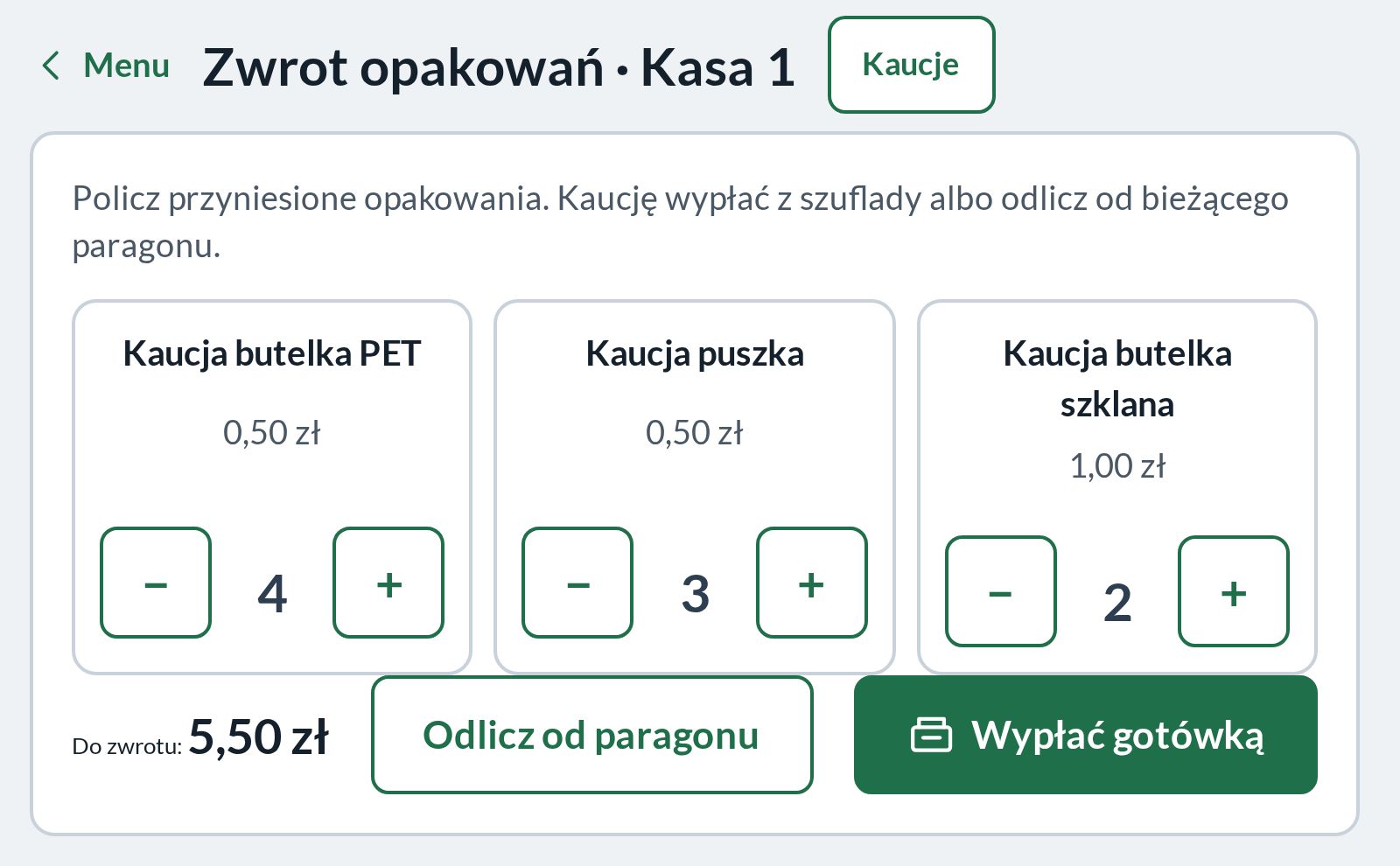
Packaging return screen at the till: 4 PET bottles, 3 cans and 2 glass bottles, PLN 5.50 to return, buttons to deduct from the receipt and to pay out cash

A computer in the shop, head office optional. Tills, self-checkout, tablets and phones connect to the computer in the shop over the local network. The internet is needed only for KSeF and head office, and the data is sent on its own when the connection returns.

Diagram: tills, self-checkout, tablets and phones connect over the local network to the computer in the shop. The computer sends invoices to KSeF and, optionally, exchanges data with the ERPNext head office. Touchscreen tillSelf-checkoutWaiter’s tabletWarehouse phone Computer in the shop program and shop datafiscal printer, terminalreceipt and ticket printingbackupsone computer per shop Head officeERPNext, optional KSeFMinistry of Finance local networkdata to head officein the background Diagram: tills, self-checkout, tablets and phones connect over the local network to the computer in the shop. The computer sends invoices to KSeF and, optionally, exchanges data with the ERPNext head office. TillSelf-checkoutTabletPhone local network Computer in the shop program and shop datafiscal printer, terminalreceipt and ticket printingbackupsone computer per shop head officeto KSeF Head officeoptional KSeFMin. of Finance

Working without internet

Sales, the printer and the back office work on the shop network. Data for head office is saved right at the sale and sent when the internet returns. While KSeF is down, you issue invoices in offline mode.

Head office is an add-on

Without head office, a shop works fully. Once connected, the program downloads the catalogue, shows a preview of changes before they are applied and compares its data with head office every night.

Installation done by us

We handle installation, configuration, migration of data from your current system, staff training and updates. Every version comes with release notes.

What head office ERP adds

Head office is a separate module for ERPNext, a business management program. These functions run in head office, not in the till itself, on the data that the shops send to it.

Head office ERP functions
FunctionWhat it does
JPK_V7A JPK_V7 file (Poland’s VAT reporting file) to download and check by your accountant. The program does not send it to the tax office.
Order suggestionsA suggestion of what to order from suppliers.
Margin and ABCA margin report and a split of products into groups A, B and C.
TipsTips from restaurants reach head office separately and are included in the accounts.

Data stays in the shop

Data on your computer.
Only what you switch on is sent to head office and KSeF.
Encrypted connection on the shop network.
We configure the shop’s certificate during installation. Phones connect to the program over an encrypted connection.
Backups every day.
Database and files: 7 daily and 4 weekly copies, optionally an off-site copy. The home page warns when the backup is too old.
Permissions and roles.
Cashier, manager, warehouse clerk and cook see only their own screens. Access can also be limited by network address.
Login.
Lock-out after a series of wrong attempts, and a separate staff PIN for self-checkout.
GDPR.
On a customer’s request, the program anonymises their data (it overwrites it; sales and reports remain), except for VAT invoices, which must be kept. Change log in the back office.

We set the price individually. Tell us how many tills you have, whether you need self-checkout, a restaurant or head office, and which fiscal printer you use.

Let’s talk Demo coming soon

FAQ

Which fiscal printers does the program work with?

The program has a driver for Posnet fiscal printers. Receipts are printed one after another, so the till never waits for the printer. If the printer does not respond, sales are paused and the cashier sees a message. We tested the driver on a Posnet emulator, not on a real printer. We check the specific model during installation.

Does the till work without internet?

Yes. The program runs on a computer in the shop, and tills and tablets connect to it over the local network. Data for head office waits in the program and is sent when the internet returns. While KSeF is down, you issue invoices in offline mode.

What does the program do with KSeF?

It issues invoices attached to a receipt and invoices for a named buyer, corrections and technical corrections, sends them in the background and shows the status and the official confirmation of receipt (UPO). It has an offline mode for KSeF outages and downloads purchase invoices, which you can use to receive a delivery. We tested it on the KSeF test environment of the Polish Ministry of Finance.

What hardware do I need?

A computer in the shop that holds the program and the data, and at the workstations any device with a browser: a touchscreen computer, a tablet or a phone. You also need a barcode scanner and a fiscal printer, and optionally a scale and a payment terminal.

Do I need a head office system or an ERP?

No. A shop works fully on its own. We set up the connection to head office (ERPNext) during installation, if you have several shops or want to manage the catalogue and promotions in one place.

Does it support restaurants?

Yes, in the restaurant edition: floor plan, table bills, courses, kitchen tickets and a kitchen screen, splitting and merging bills, and tips.

What licence is the program under?

Grosno is based on Open Source Point of Sale, released under the MIT licence. The licence notice is in the program footer and on this page.

How can I see the program?

The demo will be available soon. Contact details will appear on this page soon.
Contact

Contact details and the demo will appear here soon.